
You might be buying a laptop and wondering how long they last.
It’s a common thought.
People worry because they want to keep their laptops for as long as possible. The truth is, how long a laptop lasts depends on the quality of the machine. It also depends on how you maintain it. According to HP, the average lifespan of a computer is 3 to 8 years, but reaching the higher end requires good care, like keeping it cool and upgrading parts when possible.
Some laptops last longer than others. There are two major perspectives on laptop lifespan.
Primarily, you may think of how long individual parts of a laptop work smoothly. For instance, how long does the battery stay charged?
Alternatively, you may consider how much time it is useful to you in its application, such as while studying or at your workplace. For example, most laptops stay useful for 4–5 years for average tasks, but premium devices, especially business laptops or MacBooks, often remain reliable for 6–8 years or more.
In this post, we will delve into these issues in depth and attempt to answer the question: “How long do laptops last?” We have tried to answer every question that might come to your mind.
First, let’s look at the research-based lifespan of laptops based on price, brand, and usage.
Key Takeaways: Laptop Lifespan Comparison Table
| Category | Expected Lifespan | Notes |
|---|---|---|
| By Price | ||
| Laptops under $500 | 2–4 years | Lower build quality and specs; may not handle future software updates well. |
| Laptops $700–$1,000 | Up to 5 years | Mid-range components; good for general use with moderate longevity. |
| Laptops over $1,000 | Up to 7 years | Better build, thermal design, and upgrade options increase lifespan. |
| By Brand | ||
| Apple (MacBooks) | 7–10 years | Great build quality and long software support, but limited repairability. |
| Other Brands (HP, Dell, etc.) | 3–6 years | Varies by model. Premium lines like ThinkPads, XPS, and EliteBooks last longer. |
| By Usage Type | ||
| Gaming | 2–3 years | High-performance demands reduce lifespan due to overheating and GPU stress. |
| Business | 3–5 years | Durable machines built for daily office use, often well-maintained. |
| Basic/Home Use | 5+ years | Light browsing, video, and document usage allow for extended life. |
So, if you were wondering, do higher-end laptops last longer? Yes, higher-end laptops coming from top brands like Apple last longer than consumer machines.
Otherwise, almost all laptops, even under $500, often last around 5 years.
Does spending more money mean your laptop will last longer?
Do you think spending more money means your laptop will last longer? Well, there’s a bit of truth to that idea, but it’s not always the case.
Research suggests that if you buy a laptop for under $500, it might last 2-4 years. Spending between $700 and $1,000 could get you a laptop that lasts up to 5 years. And if you splash out over $1,000, your laptop might last up to 7 years. Some super fancy laptops can even cost up to $5,000!
But here’s the catch: once you hit around $1,500, you’re not likely to get much more lifespan out of your laptop, even if you get fancier features or a longer battery life.
No matter how much you take care of a laptop, it will eventually stop working well. Corey Donovan, who is the president of a company called Alta Technologies, says most laptops stop working after about four to five years. The battery is usually the first thing to go bad.
Business Insider states that 4-5 years is the average lifespan of a laptop under typical usage, with premium models sometimes performing well beyond that.
However, Apple devices often remain “optimally operational” for 6-8 years, due in part to longer OS update cycles.
Some older laptops let you replace the battery, which can make them last longer. But newer laptops often make it hard or even impossible to replace the battery.
How do laptop parts affect how long they stay useful?
The parts inside a laptop, like the processor and graphics card, decide how long it will stay useful. That is to say, the more valuable the parts of the laptop, including the CPU and graphics card, (if you are a gamer), RAM size, and storage capacity, the longer it stays.
If you get a cheap laptop, it might have a weaker CPU, RAM, graphics card, and memory. This affects how long the laptop lasts. But the brand name also plays a part in its lifespan.
So, in other words, if you pay more for a laptop, then it will last longer.
Below is an estimation of how long a laptop can stay relevant, depending on how much money you spend:
- Less than $700: 2-4 years
- $700-$1,000: 3-5years
- $1,000 or more: 4-7 years
Also, storage type matters: SSDs tend to last longer with lighter usage and are more durable (no moving parts), while HDDs degrade mechanically and usually begin to show failures after 3-5 years. Modern SSDs are rated for 5-10 years under regular use
However, remember that this is just a rough idea. Also, keep in mind that how you use your laptop determines how long it will work.
How does your laptop’s use affect how long it stays useful?
The purpose you wish to use your laptop for determines how long it will serve you. For instance, if you intend to play video games or do video editing with it, it will not be effective for a very long time.
On the other hand, if you only need a computer that can allow you to watch videos and check emails, among other simple tasks, then it is likely that it will stay useful for many years.
For example, a cheap laptop for around $500 isn’t good for hard tasks. It’s better for easy stuff like browsing or studying. Consequently, what you do with it determines its life span.
Consumer/budget laptops used mainly for light tasks (browsing, streaming, documents) often last 3-5 years before users feel they need to upgrade, mostly due to software demands rather than complete hardware failure.
So, the question of how long a $500 laptop will last depends on two things: A) what’s inside it, and B) what you use it for.
For example, a medium-priced laptop will usually last about 4-5 years with normal use.
Also, how you take care of your laptop matters during the time you have it. Regular maintenance (cleaning vents, avoiding excess heat, replacing thermal paste or fans if needed, and keeping software up to date) can often add 1-2 extra years of usefulness.
Does battery life impact the duration of a laptop?
The battery life of a laptop is extremely crucial to how long it can be useful. Over time, the battery also ages.
Normally, after approximately one year or two, the battery begins to lose some of its capacity. Most laptop batteries begin showing noticeable capacity loss by 2-5 years, often around 300-500 full charge cycles, retaining about 80% of original capacity after 500 cycles.
And here’s something interesting: how you charge your laptop can affect how long the battery lasts too. See, the battery can only handle a certain number of charges, and not following the right charging rules can make the battery’s health worse.
In addition to usage (charge/discharge cycles), temperature, time (also known as “calendar aging”), and the depth of discharge all contribute to the degradation of lithium-ion batteries. The battery loses capacity more quickly when it is deeply discharged or kept at extremes (high state of charge + heat).
I’ve noticed that when I keep my laptop plugged in all the time, the battery doesn’t last as long as it used to. Even the companies that make laptops suggest not leaving them plugged in all the time.
Lenovo’s glossary states that leaving a laptop plugged in continuously with the battery at 100% can contribute to faster wear; many lifespans extend if you occasionally cycle the battery and avoid high heat.
Besides, with so much happening on laptops today, such as running multiple apps and software programs, older laptop batteries drain more quickly than new ones. So, before you buy a laptop, it’s smart to check if you can replace the battery if you need to.
However, you don’t need to fret! There are a few things that you can do to extend the life of your laptop’s battery.
For example, you can decrease the level of brightness, avoid multitasking too many apps concurrently, replace speakers with headphones while using them, switch off Wi-Fi whenever not in use, and keep your laptop cool by employing a cooling mat. Consequently, these easy techniques will ensure that your laptop’s battery lasts longer than expected!
How do Different Laptop Types Affect Longevity?
Have you ever thought of how your laptop usage affects its useful life?
Laptops come in three different kinds: consumer, business, and gaming. Each one has a different lifespan.
Consumer laptops:
Consumer laptops are our everyday partners. They can be used for emails, web browsing, streaming, and so on. These guys are expected to last for around five years.
What causes it to break down? It is only for usage. Less usage equals a longer lifespan. That’s all.
Want your laptop to last a long time? Well then here is a secret: keep it clean; run updates and avoid overworking it.
Believe me, your laptop will thank you.
Business laptops:
According to Sturdy Business, the lifetime of business laptops is about 3-5 years, as they are purposely made for heavy office use.
Business laptops are built with more durable components, longer warranties, and better thermal management. For instance, consumer laptops usually last about 2.5 years, while business-grade laptops last about 5 years.
Also, JIG Technologies says business laptops often come with 3-year onsite warranties and better repairability, which helps extend usable lifespan
These types of computers are built to last longer hours of usage and have more programs. In addition, this means a lot more breakdowns.
How can you make it serve you longer? – Fix it from time to time. When operating under heavy use and high temperatures, regular software updates, good anti-virus, cooling pad or device will be a great help.
Gaming laptops:
Now let’s talk about power players—gaming laptops. These top-notch gadgets are used for playing heavy-duty games. But still, at a price, these devices don’t last that long when compared to other laptops. According to the statistics by Gitnux, gaming laptops have a shorter life span, typically lasting about 2-3 years.
Furthermore, one of the major causes of early decline is overheating; sustained high temperatures degrade components faster. Sometimes they reach temperatures of up to 212 Fahrenheit or 100 °C! This puts a lot of stress on the laptop.
Even if your laptop lives for more than five years, it may not be useful anymore due to new games that require better hardware capabilities.
What is the key to longevity? Do not let your laptop get hot. It is common knowledge among gamers that gaming laptops overheat often. Therefore, get yourself a good cooling system. It will pay off!
How do you know when it’s time to replace your laptop?
Some folks cling to their laptops long after others would toss them aside. If you’re in the IT world, though, these signs indicate it’s time to replace your laptop.
Signs Your Laptop is Ready for Retirement
Compatibility Issues:
Upgrading things such as RAM or switching to a solid-state drive can result in compatibility problems, especially if you are using a low-budget laptop.
Different companies make these parts, so replacements may be complicated without causing errors. Besides, old hardware may not go well with new software updates; hence, one should make sure that they have checked the compatibility before updating their software.
Overheating:
If you understand computers at all, then you know how hot they can get when they’re working. Laptops tend to have an internal fan for cooling purposes.
However, your laptop might have accumulated dust on the fan if it’s old. This would cause your laptop to become too hot, work slowly, or even shut down when overheated.
Slow Processes:
Over time, your laptop will start slowing down. Web pages load slower, applications take longer to open, and starting up or shutting down the laptop becomes a chore. Even basic tasks can become sluggish, especially with newer software versions.
Breakages:
Accidents happen, and even new laptops can become too expensive to fix after repairs. Drops, spills, and pressure can cause damage, so be careful!
Weird Behavior:
If your laptop crashes often, flashes or resets the screen, or struggles with multitasking, it’s clearly overworked. This is especially noticeable when switching tabs or apps. Insufficient RAM might be the issue, but be wary of compatibility problems when upgrading.
Tips for Extending Your Laptop’s Lifespan
As you know, people sell refurbished laptops online, so you might be wondering how they work properly. It’s because they take care of these laptops, update the outdated specs, and perform maintenance to ensure they function well. You can do the same with your laptop to extend its lifespan.
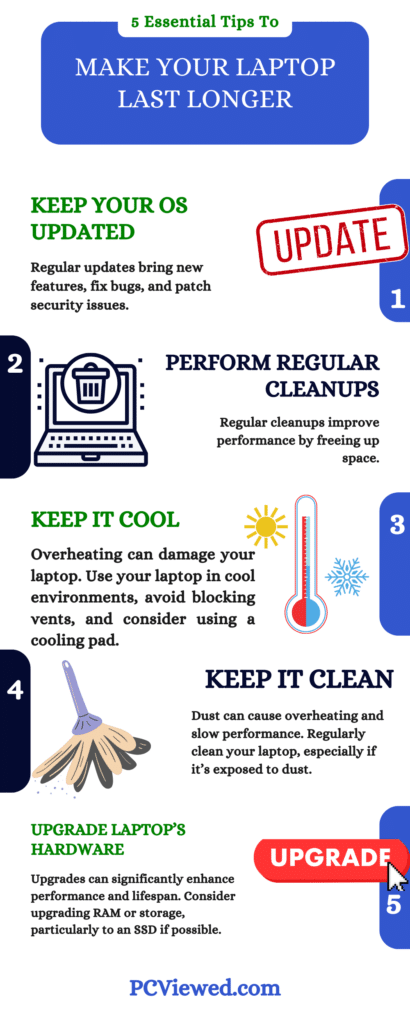
Operating system (OS) updates:
Make a point of keeping the operating system on your laptop up to date. Windows updates are useful because they add new features, fix bugs, and patch security issues; therefore, don’t ignore them.
Usually, drivers update automatically when you install Windows or iOS updates on your laptop. However, there may be occasions where doing this manually will help optimize everything.
Regular cleanups:
Give your laptop a regular cleanup—it’s like a spa day for your device.
Cleaning out unnecessary files and freeing space is crucial in improving the performance of your computer.
Liquid spills and your laptop:
Water is not good for electronics. Once there is a spill, turn off the laptop and dry it as fast as you can.
That’s why, if you have a serious accidental spillage of any liquid, get professional assistance as soon as possible. Better safe than sorry or something. Also, do not blow hot air from the hair dryer; otherwise, electronic components may overheat and cause damage. Use cold air and wait patiently enough for the battery to dry up completely.
Keep it cool:
Laptops and heat are not a good combination. Avoid using a laptop in hot rooms or under direct sunlight, and ensure that you don’t block the vents. If your laptop tends to overheat regularly, consider purchasing a cooling pad for it; they are inexpensive and efficient.
Fix problems ASAP:
Do not overlook crash issues and slow loading speeds. Try to understand why laptops slowdown, look for solutions to fix the issue or carry your laptop to a repair store immediately after noticing such problems.
Turn It Off:
Just like you need rest, so does your laptop. Leaving it on all the time can have ramifications. Make sure that you shut it down when not in use to give it some breathing space.
Keep it clean:
I have experienced this issue on the laptop that I use for my home office. I was not keeping my laptop in my bag and after a few days, it started slowing down. Upon checking I found dust on the system. So, I highly recommend keeping your laptop clean and avoid dust.
Avoid viruses:
Downloading unsafe files can seriously damage your laptop. Stay away from sketchy websites and only download files from trusted sources. Having antivirus software can help keep your laptop safe from viruses.
Use any powerful anti-virus if you face such issues. Here is a complete guide to protect your PC.
Unplug after charging:
Don’t leave your laptop plugged in all the time. Keeping it plugged in when it’s fully charged can wear out the battery faster. So, once it’s done charging, unplug it. This helps keep your battery healthy, especially if it’s not removable.
Use a cooling pad:
Heat can make your laptop wear out faster. If your laptop gets too hot often, it might not last as long.
Using a cooling pad might help a little, but not a lot. That’s why it’s important to clean your laptop regularly, too. Dust can also make your laptop get hotter, which makes it wear out faster.
Upgrade the inside of your laptop:
If you want to increase the lifespan of your laptop, you might need to upgrade it. For instance, you can upgrade RAM or storage. Instead of getting a new laptop, you can upgrade these parts, especially if you got your laptop recently.
Not many laptops can be upgraded inside like they used to be. But if yours can, upgrading the storage to an SSD can make a big difference in how fast your laptop works.
Final thought:
And there you go! The life span of a laptop can be improved significantly by taking good care of it. Keep your operating system up-to-date and drivers well updated; clean your laptop regularly; and have good antivirus protection.
Your laptop is more than just another piece of equipment; it’s an investment. It helps you work, entertains you, and even lets you play games. Therefore, why not take good care of it? Give it love and attention, which will lead to a constant, loyal friend for many years to come.
Do not forget that a well-maintained computer is always a happy one!
Can a laptop last forever?
No laptop can last forever. Usually, laptops last around 5 years, but if they are well-maintained, they can last over a decade at most.
Will a laptop last 10 years?
Yes, laptops from top brands can last for 10 years. To make it last that long, you should go for a high-end machine. Otherwise, just make sure the laptop is upgradable so you can improve it later on.
